Transformations in Ray Tracing: Understanding Representations and Applications
450 likes | 556 Views
Explore transformations in ray tracing, from generating rays to finding intersection points. Learn about rigid-body and similarity transforms, linear and affine transformations, and homogeneous coordinates. Discover how to encode translations, scales, rotations, and projections, and their applications in modeling and ray tracing.


Transformations in Ray Tracing: Understanding Representations and Applications
E N D
Presentation Transcript
Last Time? • Ray representation • Generating rays from eye point / camera • orthographic camera • perspective camera • Find intersection point & surface normal • Primitives: • spheres, planes, polygons, triangles, boxes
Assignment 0 – main issues • Respect specifications! • Don’t put too much in the main function • Use object-oriented design • Especially since you will have to build on this code • Perform good memory management • Use new and delete • Avoid unnecessary temporary variables • Use enough precision for random numbers • Sample a distribution using cumulative probability
Outline • Intro to Transformations • Classes of Transformations • Representing Transformations • Combining Transformations • Transformations in Modeling • Adding Transformations to our Ray Tracer
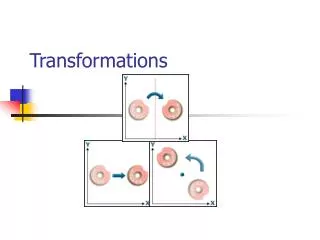
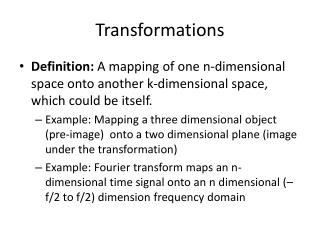
What is a Transformation? • Maps points (x, y) in one coordinate system to points (x', y') in another coordinate system • For example, IFS: x' = ax + by + c y' = dx + ey + f
Simple Transformations • Can be combined • Are these operations invertible? Yes, except scale = 0
Transformations are used: • Position objects in a scene (modeling) • Change the shape of objects • Create multiple copies of objects • Projection for virtual cameras • Animations
Outline • Intro to Transformations • Classes of Transformations • Representing Transformations • Combining Transformations • Transformations in Modeling • Adding Transformations to our Ray Tracer
Rigid-Body / Euclidean Transforms • Preserves distances • Preserves angles Rigid / Euclidean Identity Translation Rotation
Similitudes / Similarity Transforms • Preserves angles Similitudes Rigid / Euclidean Identity Translation Isotropic Scaling Rotation
Linear Transformations Similitudes Linear Rigid / Euclidean Scaling Identity Translation Isotropic Scaling Reflection Rotation Shear
Linear Transformations • L(p + q) = L(p) + L(q) • L(ap) = a L(p) Similitudes Linear Rigid / Euclidean Scaling Identity Translation Isotropic Scaling Reflection Rotation Shear
Affine Transformations • preserves parallel lines Affine Similitudes Linear Rigid / Euclidean Scaling Identity Translation Isotropic Scaling Reflection Rotation Shear
Projective Transformations • preserves lines Projective Affine Similitudes Linear Rigid / Euclidean Scaling Identity Translation Isotropic Scaling Reflection Rotation Shear Perspective
General (free-form) transformation • Does not preserve lines • Not as pervasive, computationally more involved • Won’t be treated in this course From Sederberg and Parry, Siggraph 1986
Outline • Intro to Transformations • Classes of Transformations • Representing Transformations • Combining Transformations • Transformations in Modeling • Adding Transformations to our Ray Tracer
How are Transforms Represented? x' = ax + by + c y' = dx + ey + f x y c f x' y' a b d e + = p' = M p + t
Homogeneous Coordinates • Add an extra dimension • in 2D, we use 3 x 3 matrices • In 3D, we use 4 x 4 matrices • Each point has an extra value, w a e i m b f j n c g k o d h l p x y z w x' y' z' w' = p' = M p
Translation in homogenous coordinates x' = ax + by + c y' = dx + ey + f Affine formulation Homogeneous formulation c f 1 x y 1 x' y‘ 1 a b d e 0 0 = x y c f x' y' a b d e + = p' = M p + t p' = M p
Homogeneous Coordinates • Most of the time w = 1, and we can ignore it • If we multiply a homogeneous coordinate by an affine matrix, w is unchanged a e i 0 b f j 0 c g k 0 d h l 1 x y z 1 x' y' z' 1 =
Homogeneous Visualization • Divide by w to normalize (homogenize) • W = 0? Point at infinity (direction) (0, 0, 1) = (0, 0, 2) = … w = 1 (7, 1, 1) = (14, 2, 2) = … (4, 5, 1) = (8, 10, 2) = … w = 2
Translate (tx, ty, tz) Translate(c,0,0) y • Why bother with the extra dimension?Because now translations can be encoded in the matrix! p' p x c 1 0 0 0 0 1 0 0 0 0 1 0 tx ty tz 1 x y z 1 x' y' z' 0 x' y' z' 1 =
Scale (sx, sy, sz) Scale(s,s,s) p' y • Isotropic (uniform) scaling: sx = sy = sz p q' q x sx 0 0 0 0 sy 0 0 0 0 sz 0 0 0 0 1 x y z 1 x' y' z' 1 =
Rotation ZRotate(θ) y p' • About z axis θ p x z cos θ sin θ 0 0 -sin θ cos θ 0 0 0 0 1 0 0 0 0 1 x y z 1 x' y' z' 1 =
Rotation Rotate(k, θ) y • About (kx, ky, kz), a unit vector on an arbitrary axis(Rodrigues Formula) θ k x z kxkx(1-c)+c kykx(1-c)+kzs kzkx(1-c)-kys 0 kzkx(1-c)-kzs kzkx(1-c)+c kzkx(1-c)-kxs 0 kxkz(1-c)+kys kykz(1-c)-kxs kzkz(1-c)+c 0 0 0 0 1 x y z 1 x' y' z' 1 = where c = cos θ & s = sin θ
Storage • Often, w is not stored (always 1) • Needs careful handling of direction vs. point • Mathematically, the simplest is to encode directions with w=0 • In terms of storage, using a 3-component array for both direction and points is more efficient • Which requires to have special operation routines for points vs. directions
Outline • Intro to Transformations • Classes of Transformations • Representing Transformations • Combining Transformations • Transformations in Modeling • Adding Transformations to our Ray Tracer
How are transforms combined? 0 0 0 0 0 0 1 1 1 Scale then Translate (5,3) (2,2) Scale(2,2) Translate(3,1) (1,1) (3,1) (0,0) (0,0) Use matrix multiplication: p' = T ( S p ) = TS p 0 1 0 2 0 2 1 0 3 1 2 0 0 0 2 0 3 1 TS = = Caution: matrix multiplication is NOT commutative!
Non-commutative Composition Scale then Translate: p' = T ( S p ) = TS p (5,3) (2,2) Scale(2,2) Translate(3,1) (1,1) (3,1) (0,0) (0,0) Translate then Scale: p' = S ( T p ) = ST p (8,4) (4,2) Translate(3,1) Scale(2,2) (6,2) (1,1) (3,1) (0,0)
Non-commutative Composition 0 0 0 0 0 0 1 1 1 Scale then Translate: p' = T ( S p ) = TS p 0 1 0 0 2 0 0 2 0 1 0 0 3 1 1 2 0 0 0 0 1 2 0 0 3 1 1 TS = = Translate then Scale: p' = S ( T p ) = ST p 0 2 0 1 0 2 2 0 0 0 1 0 3 1 2 0 6 2 ST = =
Today • Intro to Transformations • Classes of Transformations • Representing Transformations • Combining Transformations • Transformations in Modeling • Adding Transformations to our Ray Tracer
Transformations in Modeling • Position objects in a scene • Change the shape of objects • Create multiple copies of objects • Projection for virtual cameras • Animations
Scene Description Scene Materials (much more next week) Camera Lights Background Objects
Simple Scene Description File OrthographicCamera { center 0 0 10 direction 0 0 -1 up 0 1 0 size 5 } Lights { numLights 1 DirectionalLight { direction -0.5 -0.5 -1 color 1 1 1 } } Background { color 0.2 0 0.6 } Materials { numMaterials <n> <MATERIALS> } Group { numObjects <n> <OBJECTS> }
Class Hierarchy Object3D Sphere Group Triangle Cone Cylinder Plane
Why is a Group an Object3D? • Logical organization of scene
Ray-group intersection • Recursive on all sub-objects
Simple Example with Groups Group { numObjects 3 Group { numObjects 3 Box { <BOX PARAMS> } Box { <BOX PARAMS> } Box { <BOX PARAMS> } } Group { numObjects 2 Group { Box { <BOX PARAMS> } Box { <BOX PARAMS> } Box { <BOX PARAMS> } } Group { Box { <BOX PARAMS> } Sphere { <SPHERE PARAMS> } Sphere { <SPHERE PARAMS> } } } Plane { <PLANE PARAMS> } }
Adding Materials Group { numObjects 3 Material { <BLUE> } Group { numObjects 3 Box { <BOX PARAMS> } Box { <BOX PARAMS> } Box { <BOX PARAMS> } } Group { numObjects 2 Material { <BROWN> } Group { Box { <BOX PARAMS> } Box { <BOX PARAMS> } Box { <BOX PARAMS> } } Group { Material { <GREEN> } Box { <BOX PARAMS> } Material { <RED> } Sphere { <SPHERE PARAMS> } Material { <ORANGE> } Sphere { <SPHERE PARAMS> } } } Material { <BLACK> } Plane { <PLANE PARAMS> } }
Class Hierarchy with Transformations Object3D Group Cone Cylinder Plane Transform Sphere Triangle
Why is a Transform an Object3D? • To position the logical groupings of objects within the scene
Simple Example with Transforms Group { numObjects 3 Transform { ZRotate { 45 } Group { numObjects 3 Box { <BOX PARAMS> } Box { <BOX PARAMS> } Box { <BOX PARAMS> } } } Transform { Translate { -2 0 0 } Group { numObjects 2 Group { Box { <BOX PARAMS> } Box { <BOX PARAMS> } Box { <BOX PARAMS> } } Group { Box { <BOX PARAMS> } Sphere { <SPHERE PARAMS> } Sphere { <SPHERE PARAMS> } } } } Plane { <PLANE PARAMS> } }
Nested Transforms Translate Scale Translate Scale p' = T ( S p ) = TS p same as Sphere Sphere Transform { Translate { 1 0.5 0 } Transform { Scale { 2 2 2 } Sphere { center 0 0 0 radius 1 } } } Transform { Translate { 1 0.5 0 } Scale { 2 2 2 } Sphere { center 0 0 0 radius 1 } }